

WhatsUp Gold Technology
Systems Monitoring
Discover, monitor and manage your Server and systems infrastructure for performance and reliability
If there is one thing that you may not know on your network fully, it is likely the information on how many servers you have and what’s running on them. With the advent of Intel/AMD server configurations, servers are much cheaper to buy and operate at a department or group level. If new servers come on line sometimes without notification to you - especially when new applications are launched – you are not alone. And now with the ease of virtual machines, server sprawl is even more likely to proliferate.
No doubt this makes your job challenging. First, you need to regularly discover what’s on your network, find the new systems (physical or virtual) and bring them under the monitoring purview. Next, you need to feed and care growing IT assets and manage them through the lifecycle. After all, as a Network manager ensuring the optimal utilization and performance of these critical assets is likely at the top of your agenda. WhatsUp Gold makes your system monitoring tasks simple, by providing both WMI and SNMP based access to all servers and related infrastructure components on your network. Whether for discovery, troubleshooting, planning an upgrade or retiring servers – WhatsUp Gold delivers all the information you need in one place.
With WhatsUp Gold in place, you can:
- Discover and track the health and performance of servers on your network over time
- Diagnose and resolve impending problems before they impact end users
- Rapidly troubleshoot and recover from systems failure when it occurs
- Quickly identify both under and over utilized resources
- Optimize future investments in server capacity
WhatsUp Gold’s systems monitoring capabilities cover hardware and base operating system, virtual machine configurations and software components like shared folders and files within the environment.
Resource Monitoring
WhatsUp Gold provides powerful capabilities to monitor Windows systems of all flavors (Windows 2003, XP, Vista and Server 2008) using SNMP or WMI, as well as Unix / Linux systems using SNMP. WMI enables remote, agentless monitoring of Windows systems and applications and provides access to a variety of metrics. Performance monitoring statistics on CPU, memory and disk utilization help identify both under and over utilized systems, which are ripe for capacity reallocation or upgrade. In addition to its out-of-the box capabilities, you can develop custom performance monitors using WhatsUp Gold.
 Process Monitoring
System availability and performance can be easily tracked by monitoring the individual processes responsible for those specific services. WhatsUp Gold enables you to monitor individual Windows processes on server systems using WMI and for Unix / Linux systems using SNMP.
Virtual Machine Monitoring
Virtualization is one of the primary mechanisms used to maximize the utilization rates of existing systems resources. With WhatsUp Gold, you can monitor VMWare ESX and Microsoft HyperVisor environments, enabling IT administrators to manage both physical and virtual instances from a single console.
Hardware Monitoring
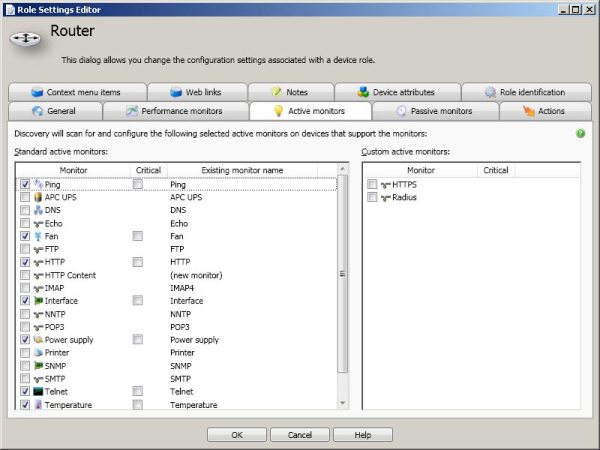
For monitoring server hardware, WhatsUp Gold includes preconfigured active monitors including fan, power supply and temperature. These monitors provide visibility into the physical state and automatically alert you if there are instances of overheating or component failure.
File System Monitoring
WhatsUp Gold provides active monitors for tracking files and folders in the monitored systems environment. For example, a File monitor can track whether a file exists or not, when a file size is more than or less than a specified size, and the last modified file date. Similarly, a Folder monitor can check to see if a local or network share folder is greater than or less than a specified size, or, if the number of files in the folder is greater than or less than a specified number of files.
Typical Problem Solving ScenariosWhatsUp Gold enables you to rapidly identify and resolve performance and downtime issues with server infrastructure. With WhatsUp Gold, you can:
- Track physical and virtual server performance, including memory and CPU utilization, to ensure slow response times are not happening from an overloaded system
- Monitor disk utilization, to ensure that sufficient capacity exists for swap and write functions and application processes are not waiting on disk I/O
- Ensure that server physical hardware characteristics are within range and not at risk of overheating from a underperforming fan or cooling system
- Monitor Windows processes for resources consumed to ensure that component services are healthy and available
- Plan for capacity upgrade in over-loaded systems or allocation of higher workload to under-utilized systems
- Create a base line of performance for individual servers to assess opportunities for cost savings through virtualization and workload re-allocation