

WhatsUp Gold Technology
Network ReportingIf you want to see what a network management tool can really do, just look at the reports. There are tools that claim to collect stats from every network device ever made or those that promise loads of analytics. But what these vendors may miss out on – is that a network management solution is only as good as the usability of its reports. Don’t take our word for it. Ask any of your peers; if they can’t quickly see the data exactly the way they need too, the network management solution might as well be shelfware.
WhatsUp Gold: The Gold Standard of Network Management Reporting
For nearly 20 years, WhatsUp Gold has been at the forefront of network management reporting, by providing comprehensive, easy to use, out-of-the box reporting across the network infrastructure. The latest release includes over 200 reports, which slice and dice the network, application, system, and hardware infrastructure from every possible angle. And the visual display of reports and graph types can be customized to meet the needs of even the most discerning network specialist.
 The Power of the WhatsUp Gold Workspace
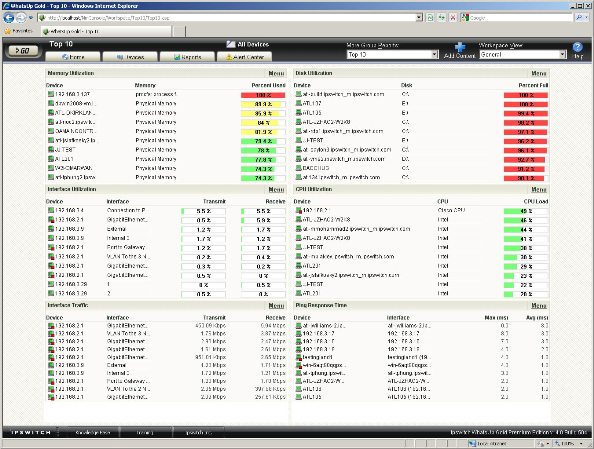
What truly differentiates WhatsUp Gold reporting is its configurable Workspaces. A Workspace is basically a blank page, which can be populated with reports. A workspace is organized and arranged using drag and drop so that reports are displayed in a way that is beneficial to the user. A WhatsUp Gold user can use the Workspace tool to configure and display any combination of reports across one or more Workspaces. As an organizational tool, the WhatsUp Gold Workspace was developed with the needs of the network manager in mind, it enables them to quickly see the data exactly the way they need to.
With WhatsUp Gold, you can create a Workspace to address multiple situations:
- Maintain an at-a-glance view of your corporate network round the clock
- Manage your datacenter or remote branch office network infrastructure
- Keep abreast of the Top 10 issues across different device groups
- Develop one on the fly to troubleshoot application performance across locations
- Separately track a business unit’s application, server and network infrastructure
- Or build one to suit whatever you need to keep track of…
Network Reporting Features
WhatsUp Gold reporting features include:
- Over 200 out-of-the-box reports on network, application, system, and hardware monitoring data
- Configurable Workspaces including three problem oriented workflows out-of-the box
- Split Second Graphs that support real-time troubleshooting needs
- Top 10 reports that provide direct access to resources under pressure
- Historical reports that support capacity planning and resource allocation activities
- Fully configurable reports with 2D/3D charts (bar, pie, line and time), custom time spans, and feature quick zoom in/zoom out functionality for troubleshooting
- Dashboard Gauges that display at-a-glance performance status of any device or system
- Instant Info mouse over capability that provides immediate real-time status
Report Categories
WhatsUp Gold organizes reports into categories for easy access. As a WhatsUp Gold user, you can create your own list of favorite reports.
Problem Areas
These reports track typical problems that may occur on your network. Reports in the category
Include: log reports (availability, outage, health, action, monitor-based, SNMP, syslog, Windows
Events, and state changes)
 Performance
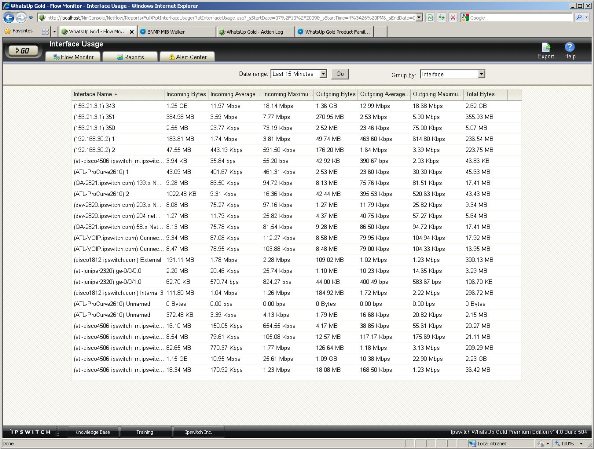
These reports show historical performance data for a device or group, including CPU, disk, memory, and interface utilization. Also included are availability and response time, as well as reports for custom performance monitors.
System
These reports show logs and diagnostic data for all devices, including: action, error, SNMP trap, syslog, Windows event, activity, Web user, and recurring activity reports.
Device
These reports show availability and performance data for a single device. Reports in this category include: CPU, disk, memory, and interface utilization. Also included are availability and response time, reports for custom performance monitors, and device oriented log, trap and error reports.
General
These reports provide access to workspaces and display data logged by WhatsUp Gold during its operation. Reports in this category include: system wide configuration, Top 10, recurring activities, actions applied, availability and state summaries, and device status.
Group
These reports display availability and performance data for devices within a group. Reports in this category include: CPU, disk, memory, and interface utilization. Also included are Top 10, availability, and response time; active monitor availability and outage; health and state change; and availability and state summary reports.