

WhatsUp Gold Technology
Monitoring TechnologiesAs a network manager, you know that not all of your devices and services are created equal. Some support critical business operations, have executive level visibility, and simply cannot fail. Others are important but can weather some downtime – though you would like to proactively identify issues and resolve them before a complete failure of service ensues. It’s only logical, that you would want to set up different levels of monitoring on the infrastructure and application services under your watch. And, since the devices and systems talk different languages, you need broad support for industry standard technologies to effectively monitor your core business applications and services.
Comprehensive coverage across industry standard technologies
WhatsUp Gold’s network management software provides the monitoring flexibility and comprehensive coverage you need. It extends full support for industry standard SNMP v1-3 and WMI based infrastructure monitoring covering most network devices and systems infrastructure (e.g. Unix, Linux hosts) and all Windows based systems – both physical and virtual. A diverse set of IP Services monitors tracks the most commonly used protocols supporting business applications including HTTP/S, FTP, SMTP/POP and others. Synthetic transaction monitoring ensures the health and integrity of generic web applications as well as SQL databases (MS SQL Server and My SQL).
 Multiple types of monitors provides the flexibility to tune monitoring to required Service levels
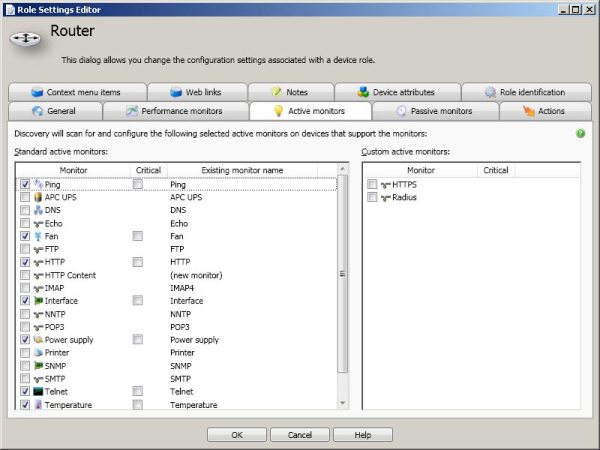
With WhatsUp Gold, you have access to multiple kinds of customizable, high-performance monitors, enabling you to select exactly the type of visibility and control you need for the level of service desired.
- Active Monitors - that track and alert you in real time when devices are services are down
- Passive Monitors – that listen for external signals (SNMP traps, log messages etc.) to identify and alert on infrastructure issues as they happen
- Performance Monitors – that track the health of network and application infrastructure over time and are key to proactive troubleshooting and planning
- Custom Monitors – that can be set up to track individual performance metrics as required
- Thresholds Monitors – that alert you when minimum or maximum thresholds are breached
- Active script performance monitors - supporting jscript and VB Script
Other key features of WhatsUp Gold monitoring capabilities include:
Pre-configured Monitors
WhatsUp Gold offers a number of pre-configured monitors right-out-of-the-box, enabling you to start monitoring as soon as an individual device is discovered and its role in the network is ascertained. Pre-configured monitor settings and roles can be easily changed through the Discovery console.
 Critical Monitors
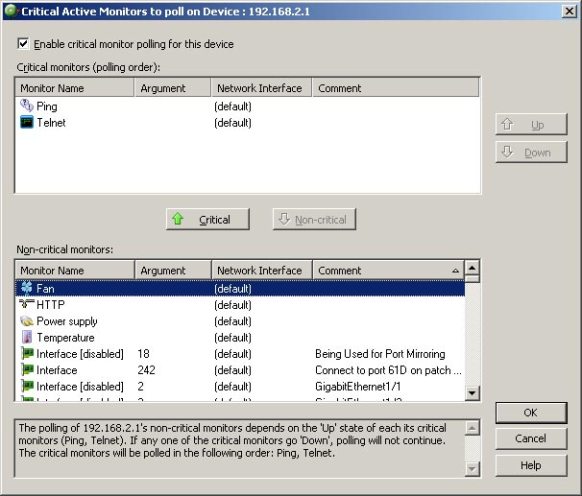
Critical monitor settings make the operation of multiple monitors in a device dependent on the status of a single monitor. This is essential to prevent alarm floods when the critical monitored component of a device fails. Without a Critical monitor setting, all other monitors for the failed device would continue to send failure alerts. For example in the case of a switch - all the configured monitors for interfaces could be made dependent on the up/down monitor applied to the uplink interface.
SNMP Set Actions
With SNMP Set Actions, you can send a SNMP Set to any remote device to change a specific SNMP object. SNMP set action can be accessed from either the web or the console. A set action can be triggered like any other action in WhatsUp Gold i.e. as a recurring action upon device state change or monitor state change on a device. All types of writable objects are supported including strings, integers, and time ticks for example.
Bulk Field Changes
Bulk field monitors enable rapid deployment or changing of monitors to any number of systems that have common network monitoring requirements - for example across multiple 3560-E Cisco switches. The bulk field change capability in WhatsUp Gold allows monitoring parameters to be quickly deployed or changed without modifying each monitor individually, saving time and effort and improving usability.
SNMP Monitoring:
You already know you need visibility into your network infrastructure, and you’ve decided SNMP makes the most sense. It would provide the most cost effective route to monitoring the network and systems infrastructure for availability and performance statistics. So why not pick any SNMP monitoring tool? Aren’t they all the same?
No they’re not. In fact, some SNMP based monitoring tools can even create more work for you. They may restrict you to limited out-of-the box capabilities that do not provide complete coverage of your environment. The result - you have to scramble together ad-hoc information from other tools or fly blind when outages occur in unmonitored devices. Others may provide many options in terms of custom configuration, but are nearly impossible to setup and configure without a PhD. What you need is a fine balance of easy deployment and configuration, comprehensive coverage and enough flexibility to adapt to your environment.
WhatsUp Gold: Comprehensive, Configurable and Easy to Use SNMP Monitoring
From the ground up, WhatsUp Gold’s SNMP monitoring capabilities were designed to be flexible, full featured and intuitive. From the novice user to the advanced custom-monitoring expert, WhatsUp Gold provides exactly what you need to get the job done, quickly and easily.
WhatsUp Gold supports the monitoring of any SNMP v1, v2 or v3 enabled device including routers, switches, servers, firewalls, and operating systems, including Windows, Unix, and Linux. In addition to powerful monitoring capabilities, WhatsUp Gold provides network management professionals with a complete set of web-based SNMP management tools, including:
- The SNMP MIB Walker, which evaluates device support and SNMP objects that can be monitored
- The SNMP MIB Manager, which instantly validates and identifies any errors in any MIB
- The SNMP MIB Explorer, which lists and validates all MIBs available ensuring that the correct SNMP parameters are used
- Multi-SNMP variable probing and trending
- The ability to build your own customizable SNMP monitors on the fly
- The ability to assign business relevant names to monitored SNMP interfaces
- Support for Gigabyte-capacity SNMP interfaces such as 10Gbps Ethernet
Why is SNMP Monitoring Important?
Simple Network Management Protocol (SNMP) is an IP based application layer protocol that facilitates the exchange of management information between a network management solution (like WhatsUp Gold) and any SNMP enabled device. Network hardware vendors automatically embed SNMP support in their devices; making it an accessible and affordable way to monitor the network.
Most major hardware vendors extend their support of SNMP beyond the basic level and incorporate deeper level proprietary metrics, which can be monitored and measured with a network management solution. SNMP is valuable because it enables you to efficiently manage network and application performance, find and solve problems, and plan for growth.
Full Industry Standard Support
No matter the device, system, service, application or OS, if it supports SNMP whether natively or through additional agent-based instrumentation, it can be managed by WhatsUp Gold.
WhatsUp Gold is fully standards compliant, supporting:
- SNMP v1-3 – public MIBS including RFCs 1157, 1212, 1901, 2578, 2579, 2576, 3411, 3418, 3584
- SNMP Security RFC 3826
Extensive Device and System Coverage
Out-of-the-box, WhatsUp Gold provides comprehensive OS, application, device, service and system SNMP monitoring support, including:
- UNIX/LINUX – Host Resources MIB – RFC 2790 and the NetSNMP MIB
- CPU, disk and memory
- Security – firewalls and IDS
- Storage – NAS and SAN, iSCSI and Fiber Channel
- Cisco® routers, firewalls and switches
- IP Services - HTTP, FTP, TCP, IP, and others
Typical Problem Solving Scenarios
With WhatsUp Gold’s out-of-the box and custom monitoring capabililties, you can:
- Track all key device metrics including memory and CPU, to ensure network slowdowns are not resulting from an overloaded device
- Monitor interface utilization over time to ensure network resources are sized appropriately
- Use the comprehensive SNMP toolset to create custom monitors – to track vendor proprietary metrics critical to your business
- Use the MIB Walker functionality to quickly test and assess a device’s support for key performance statistics