 Overview:
WhatsUp Gold Flow Monitor is a fully integrated WhatsUp Gold plug-in that simplifies network and bandwidth management, improves visibility into network traffic and bandwidth usage, and optimizes performance. It delivers detailed and actionable data on network traffic and bandwidth consumption, which helps you establish and enforce bandwidth usage policies, control ISP costs, secure the network, and provide the network capacity required by users, applications, and the business.
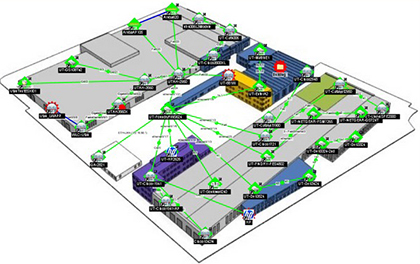
WhatsUp Gold Flow Monitor not only highlights the overall utilization of the LAN, WAN, and the internet, but also indicates which users, applications, and protocols are consuming bandwidth.
Visibility into Network Traffic and Bandwidth Usage
- Collects flow records using Cisco NetFlow, NetFlow-Lite and NSEL, Juniper J-Flow, sFlow and IPFIX protocols for extensive multi-vendor networks.
- Delivers detailed and actionable data on network traffic and bandwidth consumption.
- Monitors, alerts, and reports on interface traffic and bandwidth utilization, and sources and destinations of network traffic.
- Generates top application reports using Cisco's NBAR classification, and CBQoS reports on class-based policies.
- New First and only native support of Cisco's NetFlow-Lite – eliminates need for added complexity of 3rd party aggregator tools
Monitor network traffic and bandwidth utilization
WhatsUp Gold Flow Monitor collects flow records using Cisco NetFlow, NetFlow-Lite and NSEL, Juniper J-Flow, sFlow, and IPFIX protocols for extensive multi-vendor networks. Optimize network performance. Isolate network traffic anomalies and bottlenecks. And establish and enforce bandwidth usage policies.
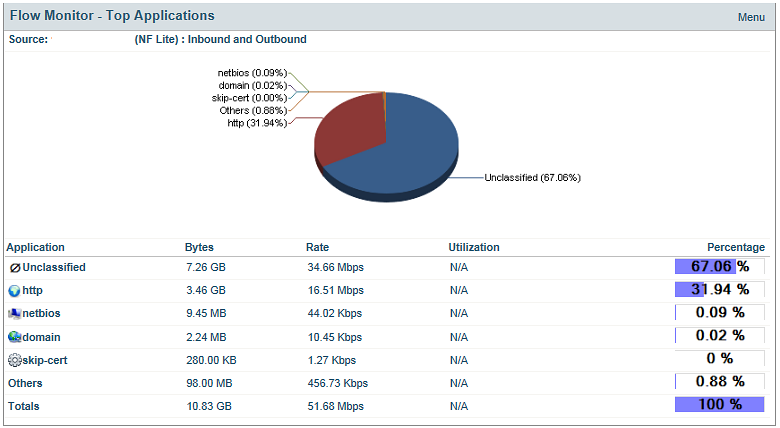
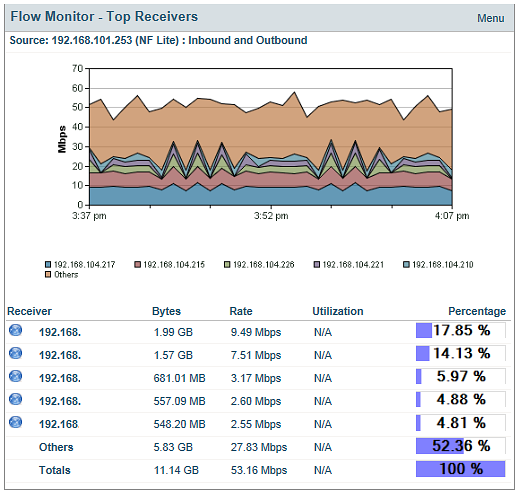
WhatsUp Gold Flow Monitor monitors, alerts, and reports on interface traffic and bandwidth utilization. It provides detailed and actionable data on the top senders, receivers, conversations, applications, and protocols consuming network bandwidth.
Control ISP costs
Identify the applications consuming expensive ISP bandwidth. WhatsUp Gold Flow Monitor reports on the bandwidth consumed by your business applications versus non-business applications (i.e. YouTube, Spotify, and League of Legends). Drill down and identify the users of non-business applications. Don't spend more on your ISP than you have to spend.
Detect users consuming excessive bandwidth
Monitor bandwidth utilization by user. Determine if bandwidth usage policies are necessary. Use WhatsUp Gold Flow Monitor drill-down data to set appropriate thresholds to alert you when users are exceeding their bandwidth usage policies.
Monitor Cisco NBAR and CBQoS
Analyze NBAR Top Application Reports that display network traffic resulting from applications identified using Cisco's NBAR classification engine. Receive reports on the effectiveness of Cisco CBQoS class-based policies.
Detect potential security risks
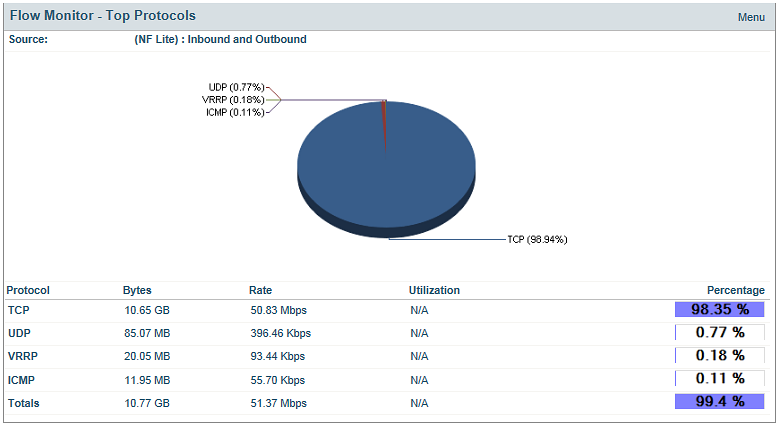
Use WhatsUp Gold Flow Monitor to track network traffic by protocol. Get alerts when UDP traffic spikes, indicating a potential DoS (Denial of Service) attack. Identify large file transfers from sensitive data assets using Peer-to-Peer protocols.
Create a unified view of your IT infrastructure
WhatsUp Gold Flow Monitor provides dozens of out-of-the-box reports that can be customized in the WhatsUp Gold dashboard. Create unified views on application, server, and network performance. Include performance views on the VMware infrastructure, and add detailed data on your network traffic — all in a single view.
System Requirements:
WhatsUp Gold Flow Monitor has the same base system requirements as WhatsUp Gold. In addition, WhatsUp Gold Flow Monitor requires:
- WhatsUp Gold Standard Edition, Premium Edition, MSP Edition, or Distributed Edition
- One or both of the following:
1. At least one routing device that supports NetFlow versions 1, 5, 7, and 9, NetFlow-Lite, sFlow versions 2 and 5, J-flow (sampled NetFlow) or IP Flow Information Export (IPFIX).
2. A Flow Publisher monitoring a flow source.
Features & Benefits:
Features:
Flow Monitoring Basics
- Support for Cisco’s NetFlow v1, v5, v9; sFlow v5; Juniper Network’s J-Flow format, standard IPFIX and Cisco NSEL (Network Security Event Logging) formats
- Dedicated SQL Server database
- Extensive support for switches, wireless networks and routers from Cisco, Juniper, Meru, Ruckus, Foundry, Extreme, Enterasys and Packeteer
- Extensive support for Cisco Nexus (virtual networks)
Monitoring/Troubleshooting Capabilities
- Automatic classification of traffic by type and protocol in real-time, including NBAR traffic
- Identification of traffic flow patterns through the network in real-time
- Identification of traffic sources (top talkers) and destinations
- Identification of traffic destination by group, domain, top level domain (TLD) and country
- Classify, filter and report on flow sources based on ASN (BGP Routing)
- Pinpoint internal and external traffic sources and destinations
- Conduct traffic identification and analysis for LAN and WAN for Quality of Service through ToS or DSCP
- Group flow data by IP addresses by domain, TLD or country
- Group flow data by source or port, so that flows can be mapped to business structures, applications and organizations.
- Automatic identification of high traffic flows to un-monitored ports and highlighting of those ports as candidates for monitoring
- Exposure of unauthorized applications, including file and music sharing
- Detection of failed connections
Reporting
- Access to 21 flow management reports via the WhatsUp Gold Web console
- Automated rollup of flow data with hourly, daily, weekly, monthly and yearly views
- User configuration of all reports to display flow information in custom formats
- Sort and display filtered reports by protocol, application, host, domain, TLD, country, groups or type of service
- Integration of flow data with WhatsUp Gold dashboard reports
- Access to WHOIS information for sender and receiver reports
- Display traffic information by bytes, packets or flows
- Interface Overview reports with 95th percentile reporting
- Top NBAR Applications and Class-based QoS reports
Configuration and Management
- Automatic discovery and configuration of flow sources via SNMP
- Automatic tuning and filtering of “noise flows” so all flows are accurately reported
- Configuration of role-based management for user access to configuration and reports
- Configuration and management of flow data retention policies
- Configuration of flow logging levels
- Support for non-standard ports and proprietary protocols
- Easily start/stop flow services
- Set address resolution levels
- Backup and restoration of flow database
- Apply custom names to flow interfaces
- Notification of database status
Benefits:
How Flow Monitor Helps Ensure Network Performance
As a network manager, how much time do you spend discovering and mapping your network, monitoring applications in both physical and virtualized infrastructure? Did you know that most of the network slowdowns can be identified and resolved by simply monitoring and analyzing your network traffic and bandwidth utilization?
With Flow Monitor you can:
- Understand how your network is being used and by whom
- Determine exactly which users, applications or hosts are consuming network bandwidth
- Display top talkers (by IP address), so you can determine exactly which hosts (authorized or unauthorized) are consuming critical bandwidth. For example, YouTube™ video streaming by multiple users may cause network congestion and slow down other critical business applications
- Verify network QoS policies required to support applications like VoIP using TOS reports
- Group flow sources and specific interfaces to focus directly on business critical systems and data flows.
- Properly measure bandwidth usage
- Automatically discover and configure flow sources
- Verify billing from bandwidth service providers with 95th percentile reporting
- Track and resolve network traffic or congestion problems using automatic classification of traffic by type and protocol in real-time
- Plan for spikes in usage to avoid dropped packages or delays
- Ensure critical business applications get the bandwidth they need
- Protect and secure your network
- Track the number of failed interface connections, which can indicate external attacks on your network and other rogue activity directed at your network
- Detect the use of unauthorized applications, enabling you to ensure your network’s security compliance and legal liability
- Track traffic anomalies to quickly detect the introduction of viruses and worms into the corporate network
FAQ:
What is flow?
A flow is a series of packets with a set of common characteristics sent between devices. As packets traverse a device, seven parameters are analyzed, if they all match exactly, then this sequence of packets is determined to be a flow. Flows are comprised of one of the IP protocols (usually TCP or UDP) depending on the end system being accessed.
What is flow management?
Flow management is the analysis of the different types of traffic traversing the network (as compared to simply looking at bandwidth utilization) to ensure the network is able to support key business applications. The practice of flow management began with the implementation of NetFlow, a technology developed by Cisco, which is part of the device IOS (internal operating system). In addition to the NetFlow format, other popular formats include J-Flow (developed by Juniper Networks), and sFlow (RFC 3176 standard). The vast majority of hardware manufacturers support one or more flow formats.
Why is flow management important?
Flow management lets you characterize the IP traffic on a network, which is critical to identifying the cause of link/network congestion, facilitating effective network capacity planning and ensuring network resources are used to support organizational goals, including the support of key business applications.
How can you use flow data?
- Traffic and bandwidth utilization analysis
- Application monitoring
- User monitoring
- Network performance monitoring
- Network capacity planning
- Security analysis
- Traffic engineering
- Peering agreement
- Usage-based billing
- Destination sensitive billing
How does it work?
Each flow enabled router or switch (source) collects and aggregates information about traffic passing through it, and when configured to do so, transmits the information to a flow enabled network management and monitoring system such as WhatsUp Gold. WhatsUp Gold then converts the flow data into actionable reports (or something to that nature).
How does WhatsUp Gold support flow management?
Flow management support is provided through a Flow Monitor plug-in that fully integrates into the WhatsUp Gold web console. It supports multiple popular formats including NetFlow, J-Flow and sFlow.
WhatsUp Gold and Cisco NBAR
Applications such as ERP or workforce optimization applications can be intelligently identified and classified using Network Based Application Recognition (NBAR). NBAR is an intelligent classification engine in Cisco IOS Software that can recognize a wide variety of applications, including Web-based and client/ server applications. Once these mission critical applications are classified they can be guaranteed a minimum amount of bandwidth, policy routed, and marked for preferential treatment.
WhatsUp Gold Flow Monitor intelligently identifies classifies and oversees NBAR traffic, including difficulty-to-classify protocols and applications that utilize dynamic TCP/UDP port assignments. With WhatsUp Gold Flow Monitor new Top NBAR Applications report you will gain a complete view of your NBAR traffic so you can accurately diagnose application performance issues and bandwidth constraints, without having to dig deeper into your traffic flows.
What components are included?
The WhatsUp Gold Flow Monitor includes all the required components to enable flow data collection and reporting including; dedicated flow SQL database, flow collector, management and configuration interface and reporting.
What Flow Technologies does Flow Monitor support?
The WhatsUp Flow Monitor offers support for all of the common flow management formats including NetFlow, sFlow, J-Flow, IPFIX and NSEL.
What type of information does it provide?
WhatsUp Gold Flow Monitor provides comprehensive information to network managers allowing them to identify, view and report on the following types of data about their network and its usage.
- Protocol
- Application (port number)
- Conversations
- Sender host
- Receiver host
- Sender domain
- Receiver domain
- Sender top level domain (TLD)
- Receiver TLD
- Top sender country
- Top receiver country
- Type of service (ToS)
How is it licensed?
The WhatsUp Gold Flow Monitor is licensed by flow source. A flow source is a device that collects network traffic data and forwards flow compliant records to a designated collector. A source can have any number of configured interfaces.
Which manufacturers support flow management?
In addition to Cisco, a number of OEM manufacturers support NetFlow. Specific information for the manufacturers is provided below.
Cisco Device Support
The following IOS versions and hardware platforms fully support flow record export for NetFlow v1, v5 and v9.
| Cisco IOS Software Release Version |
Supported Cisco Hardware Platforms |
| 11.1CA, 11.1CC |
Cisco 7200 and 7500 series, RSP 7200 series |
| 12.0 |
Cisco 1720, 2600, 3600, 4500, 4700, AS5800
RSP 7000 and 7200 series
uBR 7200 and 7500 series
RSM series |
| 12.0T, 12.0S |
Cisco 1720, 2600, 3600, 4500, 4700, AS5800
RSP 7000 and 7200 series
uBR 7200 and 7500 series
RSM series, MGX8800RPM series, and BPx8600 series |
| 12.0(3)T, 12.0(3)S |
Cisco 1720, 2600, 3600, 4500, 4700, AS5300, AS5800
RSP 7000 and 7200 series
uBR 7200 and 7500 series
RSM series, MGX8800RPM series, and BPx8650 |
| 12.0(4)T |
Cisco 1400, 1600, 1720, 2500, 2600, 3600, 4500, 4700, AS5300, AS5800
RSP 7000 and 7200 series
uBR 7200 and 7500 series
RSM series, MGX8800RPM series, and BPx8650 series |
| 12.0(4)XE |
Cisco 7100 series |
| 12.0(6)S |
Cisco 12000 series |
It should be noted that the following Cisco devices do not support NetFlow: Cisco 2900, 3500, 3660, 3750.
Other Vendor Support for Cisco’s NetFlow Format
- 3Com - 8800 Series Switches
- Adtran - NetVanta 3200, 3305, 4305, 5305, 1524, 1624, 3430, 3448, 3130, 340, and 344 (Supports NetFlow version 9)
- Riverbed
- Enterasys Networks
- Extreme Networks - Does not support input/output interface, octets, or first and last times
- Foundry Networks
- Packeteer
- VMware – ESX Server v3.5 based upon virtual switch
sFlow and J-Flow Device Support
WhatsUp Gold Flow Monitor device support includes the following manufacturers and devices:
3Com
AlaxalA Networks
- AX7800R
- AX7800S
- AX7700R
- AX5400S
Alcatel-Lucent
- OmniSwitch 6850
- OmniSwitch 9000 series
Allied Telesis
- SwitchBlade 7800R series
- SwitchBlade 7800S series
- SwitchBlade 5400S series
Brocade
- BigIron series
- FastIron series
- IronPoint series
- NetIron series
- SecureIron series
- ServerIron series
Comtec Systems
D-Link
Extreme Networks
- Alpine 3800 series
- BlackDiamond 6800 series
- BlackDiamond 8800 series
- BlackDiamond 10808
- BlackDiamond 12804C
- BlackDiamond 12800R Series
- Summit X150 Series
- Summit_X250e Series
- Summit X450 Series
- Summit i series
Force10 Networks
H3C
- H3C S7500E Series Switches
- H3C MSR 20-1X Series Routers
Hewlett-Packard
- ProCurve 2610 series
- ProCurve 2800 series
- ProCurve 2900 series
- ProCurve 3400cl series
- ProCurve 3500yl series
- ProCurve 4200vl series
- ProCurve 5300xl series
- ProCurve 5400zl series
- ProCurve 6200yl series
- ProCurve 6400cl series
- ProCurve 6600 series
- ProCurve 8212zl
- ProCurve 9300m series
- ProCurve Routing Switch 9408sl
- ProCurve Wireless Edge Services xl Module
- ProCurve Wireless Edge Services zl Module
- ProCurve Access Point 530
Hitachi
Juniper Networks
NEC
- IP8800/R400 series
- IP8800/S400 series
- IP8800/S300 series